For many business owners, website support becomes urgent only when something breaks. A page goes down, a form stops working, the site gets hacked, or an update creates a conflict that suddenly affects leads and customer trust. The problem with that approach is simple: emergencies are usually more expensive, more stressful, and more damaging than steady maintenance.
That is why a small business website retainer should be designed to prevent problems long before they become urgent. A strong retainer is not just a monthly invoice for occasional fixes. It is a structured system for keeping a website stable, secure, fast, and aligned with business goals over time.
If you are building or evaluating a website maintenance retainer for small business needs, the key is to move from reactive support to proactive support. Below is a practical framework for creating a retainer that actually reduces emergencies instead of simply charging for them after the fact.
Why Website Emergencies Happen So Often
Most website emergencies do not appear out of nowhere. In many cases, they are the result of smaller issues that were allowed to build up.
Common causes include:
- Ignored WordPress core updates
- Outdated plugins or themes
- Weak security settings
- Missing or untested backups
- Poor hosting performance
- Broken forms or integrations that go unnoticed
- No monitoring for uptime, speed, or malware
- Too many different freelancers making inconsistent changes
Small businesses are especially vulnerable because the website often supports lead generation, appointment requests, e-commerce activity, or trust-building, but there may not be an in-house technical team watching it every day. Without ongoing oversight, even a good website can slowly become unstable.
A dependable monthly website support plan closes that gap by making website health a routine process rather than an occasional reaction.
What a Retainer Should Actually Do
The best retainers are not defined by “support hours” alone. Hours matter, but they are not the whole strategy. A website retainer should create continuity, accountability, and technical consistency.
At a practical level, a good retainer should help a business:
- Reduce downtime risk
- Improve website security
- Keep software updated safely
- Maintain backups and recovery readiness
- Catch issues early through monitoring
- Preserve website speed and usability
- Support content and feature updates without delay
- Provide access to someone who already understands the site
That last point matters more than many companies realize. When multiple developers touch a website with no long-term ownership, preventable mistakes become more common. A retainer works best when the same trusted professional or team maintains familiarity with the business, platform, plugins, goals, and history.
Reactive Support vs Preventive Retainer Support
One of the easiest ways to understand the value of a preventive retainer is to compare it with a break-fix model.
| Approach | Reactive Break-Fix | Preventive Retainer |
|---|---|---|
| Updates | Done only after a problem appears | Performed routinely and tested |
| Security | Reviewed after suspicious activity | Monitored continuously |
| Backups | May be missing or outdated | Scheduled, verified, and ready |
| Performance | Addressed after complaints | Tracked and improved over time |
| Support familiarity | Often a new person each time | Ongoing continuity with the site |
| Cost pattern | Unpredictable emergency expenses | Steadier monthly planning |
| Business impact | Higher stress and downtime risk | Lower disruption and faster response |
The preventive model is usually better for small businesses because it supports planning. Predictability matters when a website plays a direct role in attracting inquiries, serving customers, or supporting advertising.
The Core Components of a Small Business Website Retainer
If the goal is to prevent emergencies, every retainer should include several foundational elements. Skipping any of these weakens the entire support plan.
1. WordPress Core, Plugin, and Theme Updates
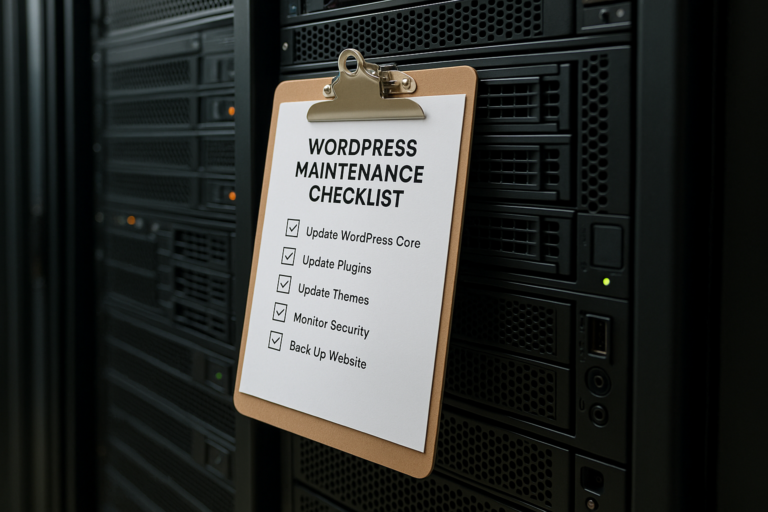
WordPress websites rely on a living software environment. Core files, plugins, and themes all need updates to remain secure and compatible. However, updates should not be done carelessly. A quality retainer includes a process for reviewing, applying, and testing updates rather than blindly clicking “update all.”

This process should include:
- Scheduled update windows
- Compatibility review
- Visual and functional testing after updates
- Rollback planning if an update causes conflict
This is one of the most important pieces of WordPress website support services because software neglect is a common source of preventable problems.
2. Reliable Backups With Recovery Planning
Backups are only useful if they are recent, complete, and restorable. Many businesses assume they are protected because a host mentions backups, but they may not know how often those backups run, how long they are stored, or how quickly they can be restored.
A retainer built to prevent emergencies should include:
- Automatic scheduled backups
- Offsite or independent backup storage when appropriate
- Backup retention policies
- Periodic restore testing
- Clear recovery procedures
A backup is not a maintenance checkbox. It is business continuity protection.
3. Security Monitoring and Hardening
Small business websites are common targets for automated attacks, spam attempts, login abuse, and malware injections. Even if a business is not a major brand, a vulnerable site can still be exploited.
A preventive retainer should include security work such as:
- Login protection
- Malware scanning
- Firewall or traffic filtering setup
- Spam reduction
- User role review
- Removal of unnecessary plugins or risky tools
- Ongoing vulnerability awareness
Security is not a one-time setup. Threats change, plugin vulnerabilities are discovered, and websites need continuous attention to stay protected.
4. Uptime and Function Monitoring
A website can appear “live” while key functions are broken. Contact forms may fail. Checkout steps may stop processing. Scheduling integrations may disconnect. Mobile layouts may break after an update.
That is why a strong website maintenance retainer for small business should include monitoring beyond simple uptime. The right plan looks for functional reliability, not just whether the homepage loads.
Useful monitoring often includes:
- Uptime alerts
- Form testing
- SSL certificate checks
- Broken link review
- Basic user-path checks for key conversions
When issues are caught early, they can often be fixed before customers notice.
5. Speed and Performance Oversight
Website performance is not just a technical concern. It directly affects user experience, trust, and conversion rates. Slow pages can reduce engagement and make marketing campaigns less effective.
Over time, websites often become heavier due to new plugins, oversized images, third-party scripts, or bloated page builders. A preventive retainer should include ongoing attention to performance, such as:
- Image optimization
- Cache review
- Database cleanup
- Script and plugin evaluation
- Hosting performance checks
- Core Web Vitals awareness
Performance issues rarely stay isolated. They tend to affect SEO, advertising efficiency, and customer confidence all at once.
6. Minor Content and Website Changes
One reason websites become outdated is that business owners delay small updates because they do not know who to contact or fear being billed unpredictably for every little request. A practical monthly website support plan should allow room for reasonable ongoing changes.
Examples include:
- Updating staff information
- Replacing images
- Editing service pages
- Posting blog content
- Adjusting calls to action
- Adding testimonials or project examples
When these smaller tasks are handled consistently, the site stays current and more useful to customers.
7. Strategy and Technical Guidance
Not every website issue is a repair issue. Sometimes a business needs guidance on whether to add a landing page, improve a lead form, simplify navigation, or prepare for a redesign phase. A retainer becomes far more valuable when it includes access to informed advice, not just labor.
This is where a long-term support relationship can become a real asset. A provider who understands both development and digital marketing can often identify opportunities before the business asks for them.
How to Structure a Retainer So It Prevents Emergencies
Good intentions are not enough. The retainer has to be structured correctly. If support is vague, inconsistent, or purely time-based without clear deliverables, prevention often gets pushed aside by whatever feels urgent that month.
Define Preventive Tasks as Required Recurring Work
Routine maintenance should not be optional or performed only if no other requests come in. Core preventive tasks need to be built into the retainer as standard recurring responsibilities.
That means the monthly workflow should clearly include updates, backups, monitoring review, security review, and testing. These are not “extra” services. They are the heart of emergency prevention.
Set Priorities for Critical Business Functions
Not every page has the same level of importance. For some businesses, the highest priority may be lead forms. For others, it may be e-commerce checkout, online booking, or location pages tied to ad campaigns.
A smart retainer identifies critical functions and gives them extra attention. That allows support efforts to align with actual business risk, not just technical preferences.
Create a Response Framework Before Problems Happen
Even great maintenance cannot eliminate every issue. The goal is to reduce risk and respond effectively when something unexpected does happen. That requires a response framework.
A useful retainer should define:
- How issues are reported
- What counts as urgent
- Expected communication process
- Who has access to hosting, domain, and website tools
- What restoration or troubleshooting steps come first
When these decisions are made in advance, support becomes faster and calmer during real problems.

Limit Technical Chaos
Many website emergencies come from uncontrolled change. A business adds plugins impulsively, multiple vendors install overlapping tools, old code remains in place, and no one documents what was done.
A preventive retainer should bring order to that environment by reducing unnecessary complexity, documenting changes, and reviewing requests before implementation. The fewer random changes a website absorbs, the more stable it tends to be.
What Small Businesses Should Look for in a Retainer Provider
Not all retainers are equal. Some providers offer basic update services, while others act as long-term technical partners. The right fit depends on the website’s role in the business, but several qualities matter almost universally.
Consistency
Small businesses benefit when the same provider or team remains involved over time. Familiarity reduces onboarding delays and improves decision-making.
WordPress-Specific Experience
For businesses running WordPress, it helps to work with a provider who understands themes, plugin conflicts, performance issues, security concerns, and common compatibility problems in that ecosystem.
Clear Scope
A good retainer explains what is included, what is considered additional work, and how support requests are handled. Clarity helps avoid frustration on both sides.
Communication
Fast fixes matter, but so does being informed. Businesses should know what was done, what risks were found, and what recommendations are being made.
Long-Term Thinking
The best WordPress website support services do not just keep a site online for another month. They help the website remain useful, credible, and adaptable as the business grows.
Common Mistakes That Make Retainers Less Effective
Even businesses that invest in support sometimes end up with retainers that do not actually prevent emergencies. Common mistakes include:
- Choosing the cheapest plan without reviewing what is truly included
- Assuming hosting alone covers security and maintenance
- Ignoring testing after updates
- Allowing too many plugins to accumulate
- Waiting too long to report small issues
- Treating the website as a finished asset instead of an active business tool
- Using a provider who only reacts to support tickets but does not monitor proactively
The strongest retainer relationships are built around shared responsibility: the provider maintains the site carefully, and the business communicates changes, priorities, and concerns early.
Why Preventive Website Support Is a Business Decision, Not Just a Technical One
It is easy to think of website maintenance as a technical expense. In reality, it is often a business protection decision. A broken website can affect lead flow, customer trust, staff efficiency, ad performance, and brand credibility.
For a small business, the website may be the first point of contact, the main lead source, or the center of multiple marketing efforts. When that asset is left unattended, the risk extends far beyond a few software updates.
A well-designed small business website retainer helps protect revenue opportunities, preserve brand trust, and reduce the time owners spend dealing with avoidable technical stress.
Conclusion
The best website emergencies are the ones that never happen. That is the real purpose of a strong retainer. Instead of paying only when something breaks, small businesses benefit most from a support plan that keeps the website healthy, monitored, updated, backed up, and aligned with business needs month after month.
If you are evaluating a website maintenance retainer for small business use, focus on prevention first. Look for a plan that includes structured updates, dependable backups, security oversight, functional monitoring, performance review, and ongoing support from someone who understands your website over time.
A smart monthly website support plan is not just maintenance. It is a practical way to reduce risk, improve continuity, and make sure your website remains a dependable business asset rather than a source of recurring emergencies.